Delhi Technological University (DTU) has officially released the Junior Office Assistant (JOA) Admit Card 2026. Aspirants appearing for the upcoming Computer-Based Test (CBT) on 24 February 2026 can now securely download their hall ticket via the official portal at dtu.ac.in.
The DTU Delhi JOA Admit Card 2026 is now live on the official Delhi Technological University website. All candidates who successfully registered for the Junior Office Assistant (JOA) position under the non-teaching recruitment drive can access their hall tickets online. Please note that the admit card is a mandatory document required for entry into the examination hall.
DTU Delhi Non Teaching Admit Card 2026 Out
The official DTU hall ticket download link for the Junior Office Assistant (JOA) examination is now active. Candidates can retrieve their admit cards by logging in with their registration number and date of birth. We strongly advise all applicants to thoroughly verify their personal details and exam center information immediately upon downloading to prevent any complications on the day of the test.
Check DTU Delhi Non-Teaching Recruitment Results 2026 Here
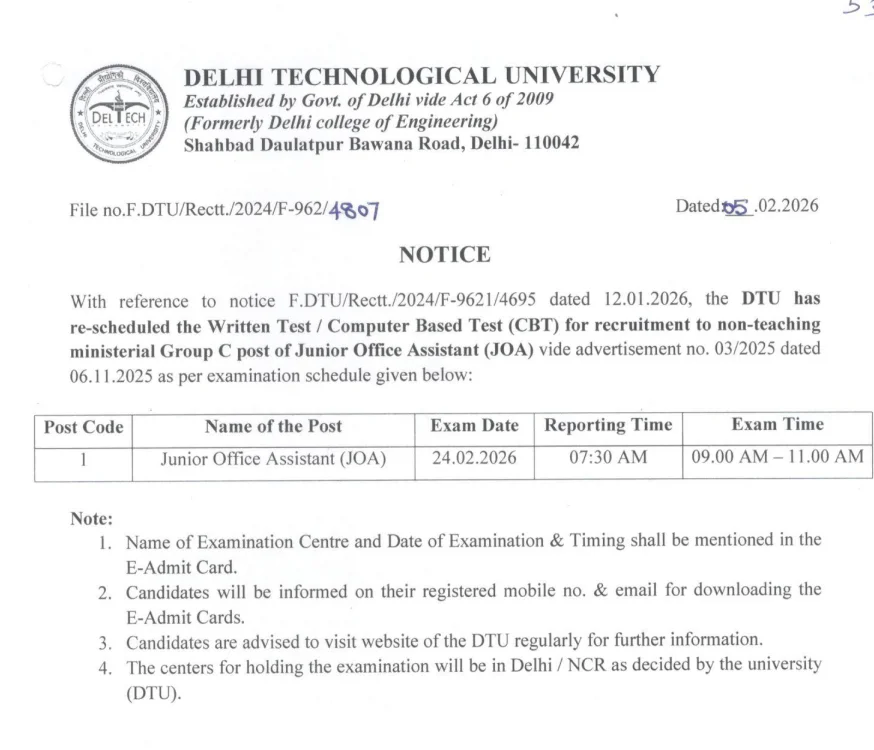
DTU Junior Office Assistant Admit Card 2026
The DTU Non-Teaching Admit Card 2026 has been issued specifically for the JOA recruitment exam. This document serves as your official entry pass, containing critical candidate information and your assigned examination center details.
| DTU Delhi Non-Teaching JOA Admit Card 2026: Overview |
|
|
|
Download Link of DTU Delhi Non-Teaching JOA Admit Card 2026
Candidates can access the direct download portal for the DTU Delhi JOA Admit Card 2026 through the official website. By using your registration credentials and date of birth, you can easily obtain your hall ticket. Please be aware that the admit card is available exclusively in digital format; no physical copies will be dispatched via postal mail.
Download Your DTU Delhi Non-Teaching JOA Admit Card 2026
Steps to Download DTU Delhi JOA Admit Card 2026
Follow these simple steps to successfully download your Junior Office Assistant hall ticket from the portal.
- Visit the official website dtu.ac.in
- Go to the Recruitment / Notices section
- Click on DTU JOA Admit Card 2026 link
- Enter your Registration Number and Date of Birth
- Submit the details
- Download and print the admit card
Details Mentioned on DTU JOA Admit Card 2026
Once downloaded, please carefully verify all printed information, including your name, photograph, exam date, and venue address.
- Candidate Name
- Roll Number
- Post Name (Junior Office Assistant)
- Exam Date & Time
- Reporting Time
- Exam Centre Address
- Important Exam Instructions
Should you discover any errors or discrepancies on your admit card, it is crucial to contact the DTU examination authorities immediately for corrections.
Important Instructions for Candidates
- Carry a printed copy of the JOA DTU admit card
- Carry a valid photo ID proof
- Reach the exam centre well before 07:30 AM
- Follow all instructions mentioned on the hall ticket
- Electronic gadgets and prohibited items are not allowed
How to Recover DTU Login Credentials
- Visit the official DTU website and open the candidate login page.
- Click on “Forgot Password” or “Forgot Registration Number.”
- Enter required details like registered email ID, mobile number, or date of birth.
- Follow the on-screen steps to reset or retrieve your credentials.
- Use the recovered details to download the DTU admit card.
Common Issues While Downloading the DTU Admit Card
- The website may be slow due to heavy traffic.
- Incorrect login details can prevent download.
- Server errors may occur during peak hours.
- Use a stable internet connection and correct credentials.
- Clear browser cache or try a different browser/device if needed.
- Contact the DTU helpdesk if the problem continues.
FAQs
Yes, the Delhi Technological University has officially released the Junior Office Assistant (JOA) Admit Card 2026 for all eligible candidates.
Currently, the admit card is available solely for the Junior Office Assistant (JOA) post. Hall tickets for other non-teaching roles will be released separately by the university.
The DTU Junior Office Assistant Computer-Based Test (CBT) is scheduled to take place on 24 February 2026.
To access your admit card, you will need your official Application/Registration Number and your date of birth or account password.
Yes, it is mandatory to bring a clearly printed copy of your admit card along with a valid original government-issued photo ID to the examination center.
Yes, you must present a physical, printed copy of your hall ticket; digital copies displayed on mobile devices are generally not accepted at the exam venue.