The PSSSB Veterinary Inspector Answer Key 2026 is now available. Candidates can download the official PDF, verify their responses, estimate their total scores, and submit objections between 21 July and 23 July 2026 before the final results are published.
The Punjab Subordinate Services Selection Board (PSSSB) has officially released the Veterinary Inspector Answer Key 2026. This provisional key allows candidates to cross-reference their exam responses against the official board-approved answers, helping them gain a clear understanding of their performance and expected marks prior to the final merit list.
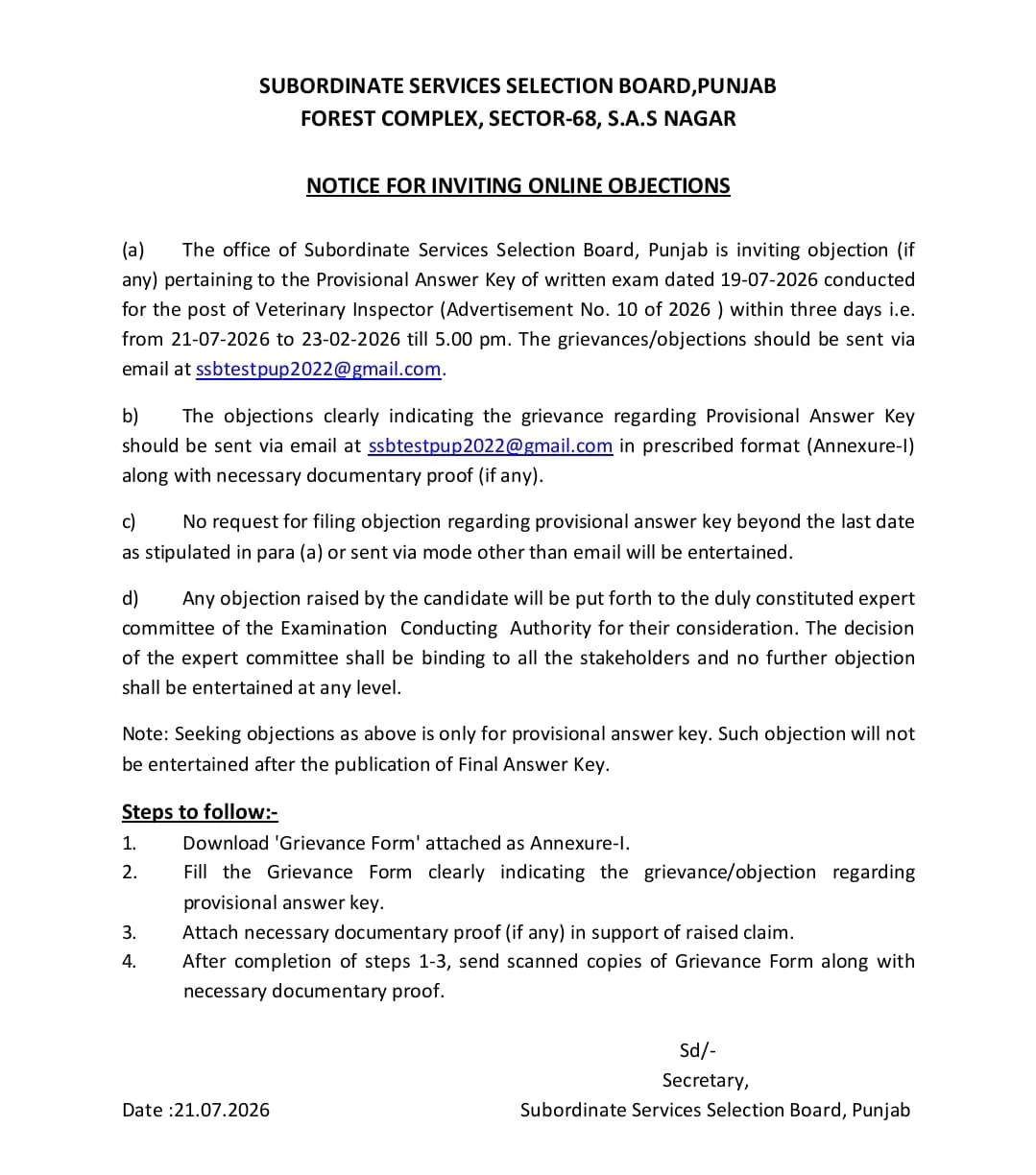
Candidates who took the exam can now review the provisional answer key and submit challenges if they identify any discrepancies. The objection window is open from 21 July 2026 until 23 July 2026, closing strictly at 5:00 PM.
PSSSB Veterinary Inspector Answer Key 2026
The PSSSB Veterinary Inspector response sheet serves as the official reference for correct answers regarding the written examination. By utilizing the provisional key, candidates can perform a self-assessment, identifying correct and incorrect answers to calculate their approximate score based on the PSSSB marking criteria.
| Particulars | Details |
| Conducting Authority | Punjab Subordinate Services Selection Board (PSSSB) |
| Exam Name | PSSSB Veterinary Inspector Recruitment Exam 2026 |
| Post Name | Veterinary Inspector |
| Category | Answer Key |
| Answer Key Status | Released |
| Objection Facility | 21 July to 23 July 2026 |
| Official Website | sssb.punjab.gov.in |
PSSSB Veterinary Inspector Answer Key 2026 Download PDF
The official answer key is accessible in PDF format on the PSSSB recruitment portal. Candidates should download the document corresponding to their specific test booklet series (A, B, C, or D) to accurately calculate their probable marks and determine their eligibility for the next stages of the selection process.
Download PSSSB Veterinary Inspector Answer Key 2026 PDF
Steps to Download PSSSB Veterinary Inspector Answer Key 2026
Follow these straightforward steps to retrieve your answer key:
- Visit the official PSSSB website www.sssb.punjab.gov.in.
- Go to the “Answer Key” or “Recruitment/Results” section on the homepage.
- Click on the link for “PSSSB Veterinary Inspector Answer Key 2026” or “Download OMR/Response Sheet – Inspector Exam 2026”.
- Log in using registration number/roll number and date of birth or password.
- The answer key and response sheet will appear on the screen.
- Download the PDF and take a printout for future reference.
PSSSB Veterinary Inspector Answer Key 2026 Objection Link
The PSSSB Veterinary Inspector answer key objection period is currently active. Candidates may submit formal objections from 21 July 2026 through 23 July 2026 (closing at 5:00 PM) by submitting the prescribed Annexure-1 form and supporting evidence via the official email provided by the board. Please note that any submissions sent after the deadline or via unauthorized channels will not be reviewed.
How to Raise Objection Against Answer Key 2026?
Because the provisional key is subject to review, PSSSB invites candidates to challenge any perceived errors. This limited-time window ensures the final answer key is accurate. The typical objection process involves gathering proof and submitting it according to official guidelines.
- Log in to the candidate portal on the official PSSSB website during the objection period.
- Open the “Objection/Challenge” link related to the Inspector Answer Key 2026.
- Select the question number and the answer you wish to challenge.
- Provide a clear explanation and, if required, upload supporting documents such as textbook references, official guidelines, or academic articles.
- Pay the objection fee per question, if the board has specified any charge.
- Submit the objection form and download/print the acknowledgement receipt.
How to Calculate Marks Using the Answer Key?
Once you have downloaded the response sheet and the answer key, you can calculate your expected score by applying the official marking scheme.
- Count the number of correct answers by matching your responses with the official key.
- Apply the marking scheme (for example, +1 for each correct answer, and negative marking if applicable).
- Subtract marks for incorrect answers if there is negative marking.
- Add up the total to get your estimated score.
Estimating your score allows you to gauge your performance and potential to qualify for the next round of the recruitment process.
What Happens After the Objection Window Closes?
After the deadline, the PSSSB will review all submitted challenges. Valid objections will lead to necessary revisions in the answer key. Following this review, the final answer key will be released, which will serve as the sole basis for calculating the recruitment results.
FAQs
The provisional answer key is published on the official PSSSB website immediately following the examination.
Candidates can access and download the document by logging into their accounts via the official PSSSB recruitment portal.
Yes, candidates are entitled to raise objections during the specified window if they provide valid documentary evidence for their claims.
Yes, eligible candidates can view and download their personal response sheets by using the official candidate login credentials on the PSSSB portal.