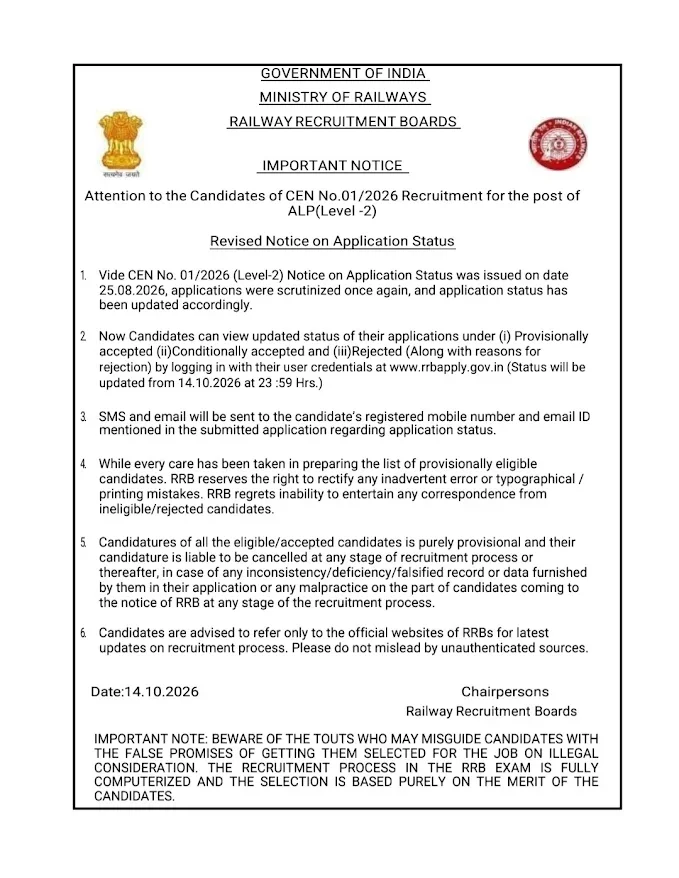
The Railway Recruitment Board (RRB) has officially updated the RRB ALP Application Status for CEN 01/2026. Candidates can now verify their application outcome—Accepted, Provisionally Accepted with Conditions, or Rejected—by logging into the official RRB candidate portal.
Following a comprehensive re-scrutiny of submitted forms, the Railway Recruitment Board released the updated RRB ALP Application Status for CEN 01/2026 on 14 October 2026. This update reflects the latest verification results, and all applicants are advised to re-check their status on the official website to ensure their information is correct.
Candidates who applied for the 11,127 Assistant Loco Pilot (ALP) vacancies should visit www.rrbapply.gov.in to view their revised status. If your application was previously rejected, the system may have updated your status following the recent review process; therefore, checking the portal is essential for all applicants.
RRB ALP Updated Application Status 2026: Official Announcement
The official application status link is now live. Candidates can determine if their candidature is Provisionally Accepted, Provisionally Accepted with Conditions, or Rejected based on the latest scrutiny of their credentials. Once logged in, candidates whose applications were rejected will be able to view the specific grounds for rejection, allowing for full transparency regarding their recruitment status.
RRB ALP Application Status 2026: Key Highlights
| Particulars | Details |
| Recruitment Body |
Railway Recruitment Board (RRB)
|
| Recruitment |
RRB ALP Recruitment 2026
|
| CEN Number |
CEN No. 01/2026
|
| Post |
Assistant Loco Pilot
|
| Total Vacancies | 11127 |
| Application Status (Updated) | Released on 14 October 2026 |
| Status Available |
Provisionally Accepted, Provisionally Accepted with Conditions (Partially Accepted), Rejected
|
| Mode to Check | Online |
| Login Credentials |
Registration Number and Date of Birth/Password
|
| Official Website | rrbapply.gov.in |
Direct Link to Check RRB ALP Application Status
As per the official notification, the application status link for the Assistant Loco Pilot recruitment is accessible on the official portal. To access your result, ensure you have your Registration Number and Date of Birth or Password ready. Use the link provided below to log in directly.
Direct Link: Check RRB ALP Application Status 2026
Step-by-Step Guide: How to Check RRB ALP Application Status 2026
Follow these simple steps to verify your current application status on the RRB portal:
- Visit the official RRB application portal, rrbapply.gov.in.
- Click on the Candidate Login option.
- Enter your Registration Number and Date of Birth/Password.
- Fill in the Captcha Code and click Login.
- Your RRB ALP Application Status 2026 will appear on the screen.
- Check whether your application is Provisionally Accepted, Provisionally Accepted with Conditions (Partially Accepted), or Rejected.
- Download or take a screenshot of the status for future reference.
Required Login Credentials
To view your RRB Assistant Loco Pilot (ALP) 2026 application status, please keep the following information ready:
- Registration Number
- Date of Birth
- Captcha Code for verification
By inputting these credentials correctly into the official RRB website, you will be able to see the live status of your recruitment application.
Understanding Your RRB ALP Status
Following the rigorous verification of forms, your dashboard will display one of three statuses based on your submitted documentation and eligibility criteria.
| Application Status | Meaning |
| Provisionally Accepted |
Your application has been accepted and you are eligible to appear for the CBT, subject to document verification and fulfillment of eligibility conditions.
|
| Provisionally Accepted with Conditions (Partially Accepted) |
Your application has been accepted conditionally. You may be required to satisfy certain eligibility or document-related conditions during later stages of recruitment.
|
| Rejected |
Your application has not been accepted. The rejection reason will be displayed on the login portal.
|
Common Reasons for Application Rejection
RRB applications are typically rejected for reasons such as mismatched photograph/signature, incorrect educational qualifications, or duplicate registrations.
- Incorrect or blurred photograph/signature
- Invalid educational qualification
- Incomplete application form
- Non-payment of application fee
- Multiple applications submitted
- Incorrect personal details
- Failure to meet eligibility criteria
- Invalid category or reservation claim
- Mismatch in uploaded documents
What to Expect After Checking Your Status?
Candidates with an 'Accepted' or 'Provisionally Accepted' status should shift their focus to preparing for the upcoming Computer Based Test (CBT). Stay tuned for official updates regarding:
- Exam City Intimation Slip
- Admit Card
- CBT Exam Schedule
Official RRB Assistant Loco Pilot Help Desk
If you encounter any technical issues or have discrepancies regarding your status, contact the official RRB helpdesk for immediate assistance.
| For Queries | Contact Details |
| Phone |
9592-001-188, 0172-565-3333
|
| Timing |
10:00 AM to 05:00 PM (Monday to Friday)
|
Important Guidelines for Applicants
All candidates should carefully review their status and adhere to instructions provided by the Railway Recruitment Board to ensure a smooth examination process.
- Check the application status only through the official RRB portal.
- Keep your Registration Number and Date of Birth ready before logging in.
- Download and save a copy of your application status.
- Candidates with accepted applications should regularly monitor updates regarding the exam city slip and admit card.
- Do not rely on unofficial websites or social media for recruitment updates.