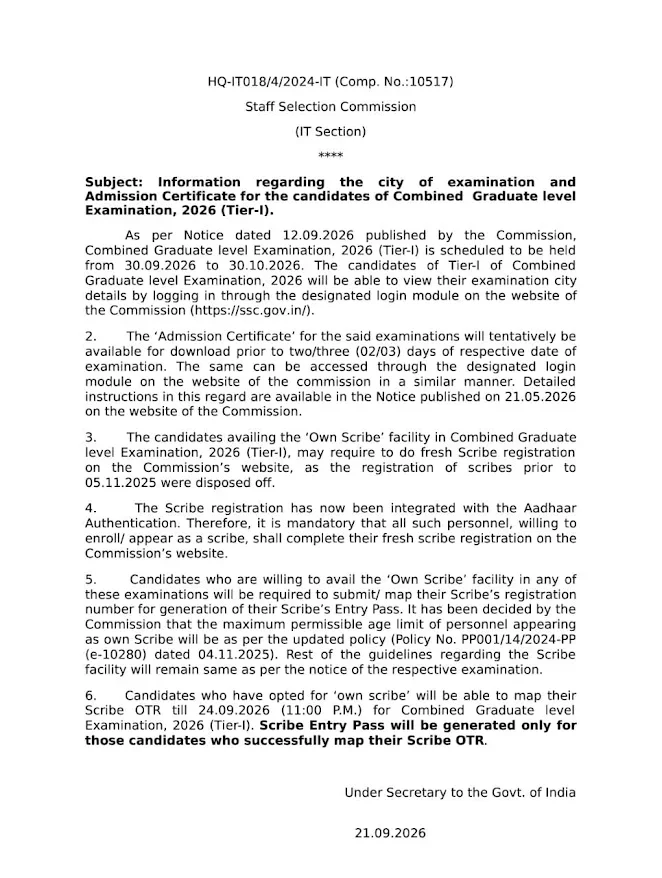
The SSC CGL City Intimation Slip 2026 for the Tier 1 examination is now live. Candidates can verify their allotted exam city, date, and shift timing. This guide provides a direct download link, step-by-step instructions, and vital clarifications on the difference between the city slip and the final admit card. The Tier 1 exam is scheduled from 30 September to 30 October 2026.
The Staff Selection Commission (SSC) has officially released the SSC CGL City Intimation Slip 2026 for Tier 1 applicants. By accessing the official SSC website with your login credentials, you can retrieve details regarding your examination city, date, and shift. Reviewing this information early is essential for planning your travel and logistics to the exam center.
SSC CGL City Intimation Slip 2026: Official Release
The SSC CGL Tier 1 Exam 2026 will be conducted in a Computer-Based Examination (CBE) format from 30 September to 30 October 2026. This recruitment drive aims to fill 10,731 tentative Group B and Group C vacancies across various government departments.
While the city intimation slip serves as an advance notification to help you plan your travel, it is not your admit card. Your official hall ticket will contain specific details such as the exact test center address, reporting time, and mandatory exam-day guidelines.
Check Status: SSC CGL Admit Card 2026 Now Available
SSC CGL Exam City Intimation – Key Details Overview
| Particular |
Details
|
| Exam Name |
SSC Combined Graduate Level Examination 2026
|
| Tier | Tier 1 |
| City Intimation Slip | Released |
| Tier 1 Exam Dates |
30 September to 30 October 2026
|
| Tier 2 Exam Date |
December 2026
|
| Exam Mode |
Computer-Based Examination
|
| Vacancies | 10731 |
| Information Available |
Exam City, Exam Date and related details
|
| Official Website | ssc.gov.in |
Direct Link to Download SSC CGL Tier 1 City Slip
To access your Tier 1 City Intimation Slip, visit the official SSC portal and log in using your registration number and password. For your convenience, a direct access link is provided below.
Download SSC CGL City Intimation Slip 2026 – Official Link
Boost Your Prep: Practice SSC CGL Previous Year Question Papers
Steps to Download Your SSC CGL Exam City Slip 2026
Follow these simple steps to check your assigned SSC CGL examination city:
- Visit the official SSC website at ssc.gov.in.
- Click on the Login/Register option available on the homepage.
- Enter your Registration Number/Username and Password in the login window.
- Click on Submit to access your account.
- Find and select the link for SSC CGL Examination 2026.
- Click on the SSC CGL City Intimation Slip 2026 link.
- Check the allotted examination city and exam date displayed on the slip.
- Download the city intimation slip and save it for future reference.
Important Information on Your SSC CGL Exam City Slip
The city intimation slip displays essential details including:
- Candidate’s name
- Examination name
- Registration/application details
- SSC CGL Tier 1 exam date
- Allotted examination city
- Relevant examination instructions
SSC CGL Tier 1 Exam Schedule 2026
The SSC CGL Tier 1 exam is scheduled to run from 30 September to 30 October 2026 in multiple shifts via a computer-based format. This examination process supports the recruitment of 10,731 candidates for various prestigious Group B and C positions.
View Official Notice: SSC CGL Exam Date 2026
Overview of SSC CGL Tier 1 Exam Pattern 2026
The Tier 1 exam features four sections comprising a total of 100 questions, worth 200 marks. The test duration is 60 minutes. Please note there is a negative marking of 0.50 marks for each incorrect response.
| Subject | Questions | Marks | Duration |
| General Intelligence & Reasoning | 25 | 50 | 15 Min |
| General Awareness | 25 | 50 | 15 Min |
| Quantitative Aptitude | 25 | 50 | 15 Min |
| English Comprehension | 25 | 50 | 15 Min |
| Total | 100 | 200 | 1 Hour |
SSC CGL Exam Shift Timings
The Tier 1 examination will be held in multiple daily shifts to accommodate all applicants. The reported shift schedule is provided below:
| Shift | Reporting Time | Gate Closing Time | Exam Time |
| Shift 1 | 8:30 AM | 9:30 AM |
10:00 AM to 11:00 AM
|
| Shift 2 | 12 PM | 1 PM |
1:30 PM to 2:30 PM
|
| Shift 3 | 3:30 PM | 4:30 PM |
5 To 6 PM
|
Can I Request a Change for My Allotted Exam City?
During the application process, candidates selected their preferred exam city choices. The SSC allocates the final city based on capacity and candidate volume. Due to high competition and limited center availability, you may not always receive your top choice.
Please note that the SSC does not accept requests to change the exam city once the intimation slip is issued. The allocation is final; we recommend finalizing your travel and accommodation arrangements early based on the information provided in your slip.
SSC CGL Exam City Slip vs. Admit Card (Call Letter)
The City Intimation Slip is for travel planning, whereas the Admit Card (Call Letter) serves as your official entry permit. You will need your official hall ticket for verification and entry into the examination hall on the day of your test.
| Point | City Intimation Slip | Hall Ticket |
| What it Shows | Only the exam city, date, shift |
Exact centre address, roll number, reporting time, shift
|
| Release Status | Released on 22 Sept 2026 | 2-3 days before exam date |
| Entry to exam hall | Not valid for entry |
Mandatory for entry
|
| Photo/signature | Not included | Included |
| Purpose | Plan travel and stay |
Confirms exam appointment
|
| Download | ssc.gov.in, same login |
ssc.gov.in, same login
|
Troubleshooting: Common Issues Accessing the City Slip
If you encounter errors while downloading your city intimation slip, ensure your internet connection is stable and you are using the correct credentials. Below are common issues and solutions to help you retrieve your slip seamlessly.
| Issue | What to Do |
| SSC website is slow or not opening |
Wait a few minutes and try again. Early morning or late night usually has less load.
|
| Forgot password |
Use the “Forgot Password” option on the login page and reset it with your registered details
|
| Login failed or “invalid credentials” |
Recheck your registration number and password. Check that Caps Lock is off. Copy and paste carefully, as extra spaces cause errors
|
| City slip not showing yet |
Check the portal again later. If your exam date is close and it still isn’t visible, contact SSC through the helpdesk or your regional office
|
| Details look wrong (name, exam, date) |
Do not ignore it. Note the issue, take a screenshot, and report it to SSC through the official contact channels
|