The official IBPS Clerk 2026 application correction window for CRP Clerk-XVI is now open from 4th to 5th September 2026. Applicants can modify their submitted data once by paying a nominal fee of Rs. 200. Review the locked fields, category modification guidelines, and the direct correction link below.
IBPS Clerk 2026 Application Correction Window Live
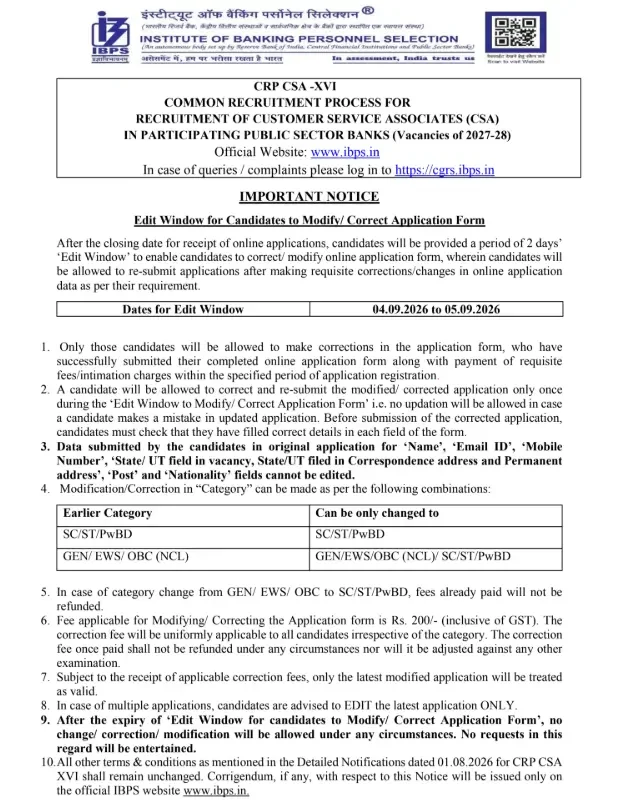
Following the conclusion of the registration process for the IBPS Clerk 2026 recruitment, the Institute of Banking Personnel Selection has activated the correction facility. Candidates have a brief 48-hour window—from 4 September to 5 September 2026—to rectify any errors in their application forms. A mandatory correction fee of Rs. 200 applies to all candidates, regardless of their social category.
Direct Link for IBPS Clerk Application Correction
Use the official portal link provided below to log in and securely modify the information in your previously submitted IBPS Clerk application form.
Access IBPS Clerk 2026 Application Correction Link – Official Site
How to Edit Your IBPS Clerk Application Form
Candidates seeking to update their submitted information should follow these simple steps to ensure their modifications are successfully saved:
- Visit the official IBPS website @www.ibps.in.
- Locate and click on the CRP CSA-XVI Edit Window / Application Correction link.
- Log in using your registration number and password/date of birth.
- Navigate to the fields you wish to edit
- Make the required corrections carefully.
- Pay the correction fee of Rs. 200/-
- Review all details thoroughly before final submission, since only one edit attempt is allowed.
- Submit the corrected form and save/download the confirmation for future reference.
Application Correction Fee Details
| Particulars | Amount |
| Correction/Modification Fee |
Rs. 200/- (inclusive of GST)
|
| Applicable To |
All categories uniformly
|
| Refund Policy |
Non-refundable under any circumstances
|
| Adjustment Against Other Exam | Not permitted |
Eligibility for Application Modification
This correction facility is available exclusively to candidates who successfully registered and paid the application fee before the original deadline. Please review the specific terms and restrictions before finalizing your changes.
- A candidate is allowed to correct and resubmit the modified application only once during the Edit Window.
- If an error is made while updating, no further correction will be permitted
- In case of multiple applications submitted earlier, candidates are advised to edit only the latest application; older applications will not be considered.
- Once the Edit Window closes, absolutely no request for change, correction, or modification will be entertained under any circumstances.
Locked Fields: Information You Cannot Change
Certain critical fields are non-editable to maintain the integrity of the selection process. These include:
- Name
- Email ID
- Mobile Number
- State/UT field in vacancy
- State/UT field in Correspondence Address
- Permanent Address
- Post
- Nationality
Category Modification Policies for IBPS Clerk 2026
| Earlier Category |
Can Be Changed To
|
| SC/ST/PwBD | SC/ST/PwBD |
| GEN/EWS/OBC (NCL) |
GEN/EWS/OBC (NCL)/SC/ST/PwBD
|
Important Dates and Official Updates
| Conducting Body |
Institute of Banking Personnel Selection (IBPS)
|
| Recruitment Name |
CRP CSA-XVI (Customer Service Associates)
|
| Vacancy Cycle | 2027-28 |
| Notification Issued | 01.08.2026 |
| Edit Window Opens | 04.09.2026 |
| Edit Window Closes | 05.09.2026 |
| Correction Fee |
Rs. 200/- (inclusive of GST)
|
| Official Website | www.ibps.in |
| Grievance Portal | cgrs.ibps.in |
Frequently Asked Questions (FAQs)
When is the IBPS Clerk 2026 Edit Window active?
The correction window is accessible for a limited duration from 4th September 2026 to 5th September 2026.
Who is eligible to access the IBPS Clerk edit facility?
Eligibility is restricted to candidates who submitted their complete application and finalized payment within the standard registration window.
Is there a limit to how many times I can edit my form?
Yes, candidates are permitted to modify and re-submit their application form only once during the active edit period.
What is the required fee for IBPS Clerk application changes?
A uniform correction fee of Rs. 200/- (inclusive of applicable GST) is required for all candidates.
Can I get a refund for the correction fee?
No, the correction fee is strictly non-refundable and cannot be adjusted or transferred to other recruitment processes.
Can I update my name or mobile number during this window?
No. Critical data such as Candidate Name, Email, Mobile Number, State/UT, Post, and Nationality remain locked for security purposes.
Am I permitted to change my category?
Yes, you may update your category; however, please note that no partial or full refunds will be issued for previous payments made under a different category.
How should I handle multiple application submissions?
You are strongly advised to edit only your final, most recent application, as only the latest version will be processed.
Are post-deadline corrections possible?
No, requests for changes will not be considered once the correction window officially closes on 5th September 2026.