The Union Public Service Commission (UPSC) has officially rolled out the recruitment drive for 80 Assistant Provident Fund Commissioner (APFC) openings within the Employees' Provident Fund Organisation (EPFO) for the year 2026. This prestigious Group 'A' Gazetted role attracts aspirants nationwide due to its career progression and administrative stature. This comprehensive guide outlines everything you need to know about the examination timeline, eligibility requirements, application fee, and procedures to ensure a seamless registration experience.
UPSC EPFO APFC Recruitment Schedule 2026
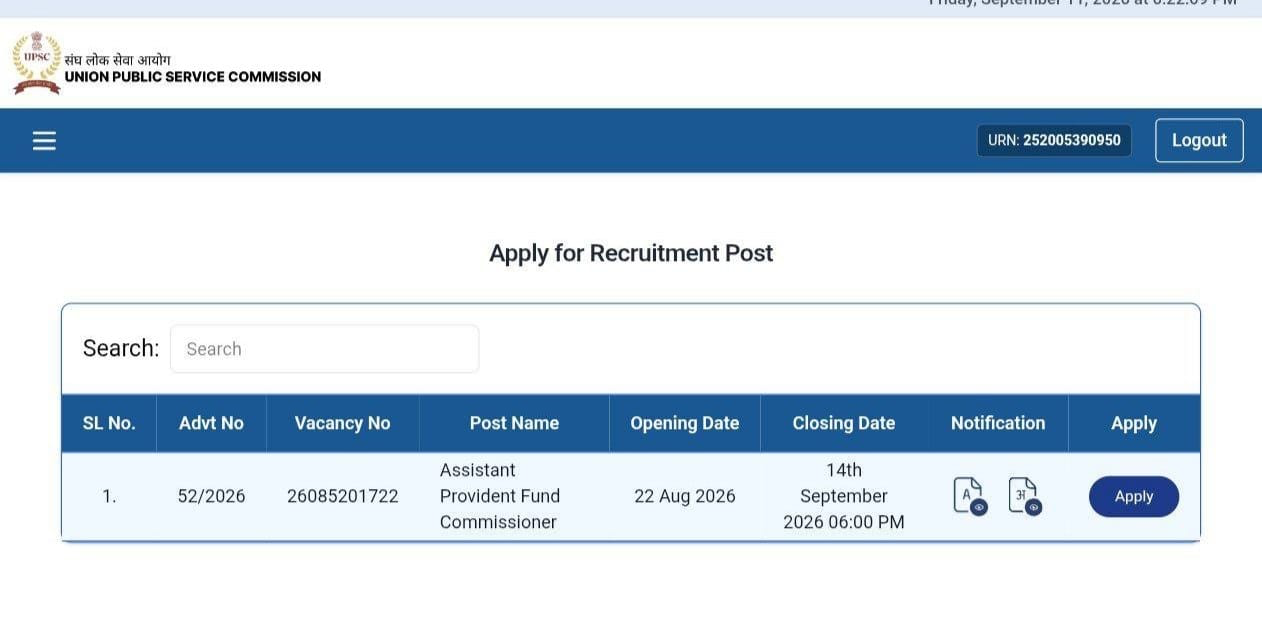
Aspirants must keep track of critical calendar milestones to avoid missing deadlines. The official notification was promulgated on 21st August 2026, followed immediately by the opening of the application window.
| Event | Date |
|---|---|
| Detailed Notification Released | 21st August 2026 |
| Online Application Start | 22nd August 2026 |
| Last Date for Online Application | 14th September 2026 (till 6:00 PM) |
| Recruitment Test (RT) | 20th December 2026 |
| Interview | To be notified after RT results |
Vacancy Distribution
The total capacity of 80 vacancies is distributed among various categories according to government reservation regulations.
| Category | Vacancies |
|---|---|
| Unreserved (UR) | 29 |
| OBC | 18 |
| SC | 15 |
| ST | 10 |
| EWS | 8 |
| Total | 80 |
Eligibility Criteria and Qualifications
Before proceeding with applications, candidates must verify that they fulfill all required parameters regarding age, education, and nationality.
| Criteria | Requirement |
|---|---|
| Age Limit | 18 to 35 years (Age relaxation: UR/EWS 35 years, OBC 38 years, SC/ST 40 years) |
| Educational Qualification | Bachelor’s degree in any discipline from a recognised University or Institution |
| Desirable Qualification | Diploma in Company Law, Labour Laws, or Public Administration |
| Nationality | Citizen of India, or a subject of Nepal/Bhutan, or a Tibetan refugee (pre-1962), or a person of Indian origin migrated from Pakistan, Burma, Sri Lanka, or East African countries with intent to permanently settle in India |
Application Fee Structure
The application fee is kept minimal, with substantial exemptions granted to safeguard inclusive participation.
| Category | Fee |
|---|---|
| UR/OBC/EWS (Male) | Rs. 25 |
| SC/ST/PwBD candidates | Exempted |
| All female candidates | Exempted |
Documents Needed for Application
Keep the following items ready before beginning your digital submission process:
- Photograph (must be recent passport-size photo)
- Signature (Scanned signature on white paper)
- Educational certificates (graduation degree/marksheet)
- Category certificate (Required only if you belong to SC/ST/OBC/EWS)
- Valid ID proof: Aadhaar Card, PAN Card, Passport, or Voter ID
- Active email ID and mobile number
How to Fill the UPSC EPFO Application Form 2026
Follow these sequential steps to complete your registration successfully on the platform UPSC EPFO APFC Apply Online 2026 Link – Active:
- Visit the official UPSC portal: upsconline.nic.in (UPSC ORA).
- Register with basic details to generate your login credentials.
- Fill in personal, educational, and category details in the online application form.
- Upload scanned photograph, signature, and category/PwBD certificate (if applicable) in the prescribed format.
- Pay the application fee online, if applicable (exempted categories can skip this step).
- Review the complete application on the preview page before final submission.
- Submit the form and download/save the confirmation page for future reference.
Important Instructions & Common Pitfalls to Avoid
Take note of these important advisory points:
- Do not wait until the last day due to potential website traffic/crashes.
- Category (SC/ST/OBC/EWS/UR) cannot be changed after submission.
- Ensure photo/signature are in the prescribed format.
- Ensure name spelling matches across application, ID proof, and certificates.
- Always save the confirmation page/printout.
- Verify you meet age and qualification criteria based on the cut-off date.
Final Instructions Before Submitting
Double-check your credentials with this final checklist before submitting:
- Verify educational qualification, age, and eligibility requirements.
- Carefully check personal information (name, DOB, category, gender).
- Review the complete form before clicking submit.
- Verify transaction status if paying a fee.
- Download/save a copy of the completed application form.
- Record registration/application number and login details.
Once your submission is complete, focus your preparation towards the Recruitment Test scheduled for 20th December 2026. Stay tuned for admit card announcements and center allocations.